 Interview Copilot
Answer the question you were actually asked.
Interview Copilot listens to the call, writes the transcript as it happens, and lifts the interviewer's question out of the noise — so you spend your thinking on the answer instead of on note-taking.
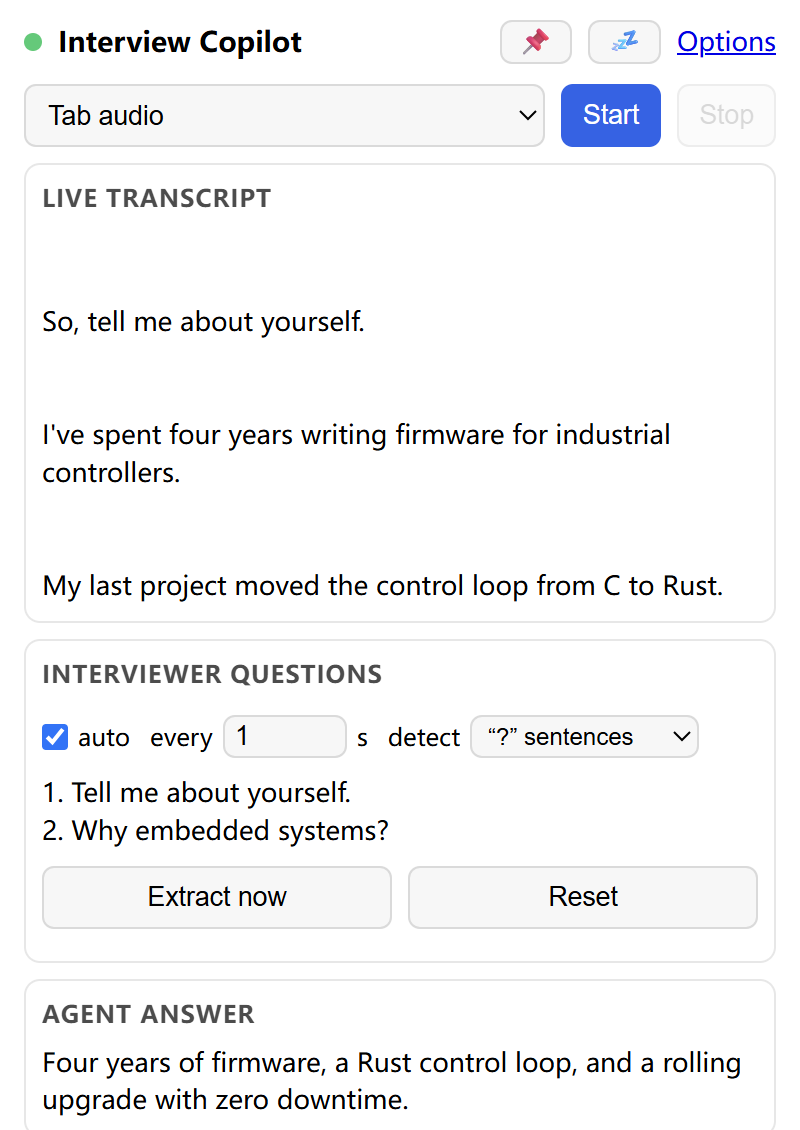
Ten seconds of silence, right after the question.
Interviews are a listening test with a memory test bolted on. The tools people use — notebooks, a second monitor, a friend on the call — all fail at the same moment: while the question is still being spoken.
You lose the thread
You are still finishing the previous answer when the next question lands, and half of it slips past.
You answer the wrong thing
"Tell me about a time you disagreed with a manager" becomes a story about a deadline. The question asked is not the question answered.
You remember later
The perfect example arrives on the drive home. No transcript exists to check what was actually asked.
Three moves, one panel.
Everything is scoped to the tab you point it at. Nothing is captured before you press Start, and nothing is captured after you press Stop.
Point it at the interview tab
Click the toolbar icon on the tab that plays the call and press Start. Chrome asks once for that tab's audio; the extension never sees the rest of your browsing.
It listens and writes
Audio streams to Deepgram with your key and comes back as text, line by line, with the speaker number kept on each line. The transcript is mirrored to transcript.txt.
It pulls out the real questions
Question-mark sentences and imperative prompts — "Tell me about…", "Please walk me through…" — are lifted into the questions list. Statements that only look like questions, like "What I did was…", are left where they belong: in the transcript.
Your agent drafts the answer
Point the extension at your own agent endpoint and the drafted answer appears in the panel within seconds. Leave delivery off and the panel stays a transcript and a question list — still useful, entirely local.
Built for the thirty seconds before you answer.
Live transcript
Words appear while they are spoken, so you can re-read a question instead of asking for it twice.
Question detection that says no
Rules for the shapes an ask actually takes, plus guards for the free relative clauses that fooled every other detector.
Answer from your own agent
The question is posted to the endpoint you configure — your model, your prompt, your budget.
Floating panel
Pin the panel above other windows so it never hides behind the call.
Files on disk
Transcript and questions are written to your Downloads folder, or into a folder you pick.
Your keys, your bill
A Deepgram key is required; CommandCode is optional. Nothing is proxied through a server of ours.
The call never touches our servers.
There is no backend. The extension talks to the services you configure and stores everything else on your machine.
- Recording is explicit. Audio is captured only between Start and Stop, only from the tab you started on.
- Keys stay local. They live in
chrome.storage.localon this device and are sent only to the provider they belong to. - Delivery is opt-in. With delivery set to none, no question ever leaves the browser.
- No telemetry, no ads, no analytics SDK. There is nothing to phone home with.
What leaves the browser
Only what you configured:
Questions people actually ask.
Which meetings does it work with?
Anything that plays audio in a Chrome tab: Google Meet, Zoom on the web, Teams on the web, a recorded interview, a mock call on YouTube. If you can hear it in a tab, the extension can transcribe it.
Do I need my own API key?
Yes — a Deepgram key for transcription, and optionally a CommandCode key if you want LLM question extraction instead of the built-in rules. Deepgram has a free tier; a one-hour interview costs very little.
Will it answer for me automatically?
Only if you enable delivery and give it an endpoint. The extension ships with delivery off: out of the box it is a transcript plus a list of the questions that were asked.
Where does the transcript go?
Into transcript.txt and question.txt in your Downloads folder, or into a folder you pick with the File System Access API. Nothing is uploaded to a server of ours, because there is none.
Is the extension on the Chrome Web Store?
It is listed as unlisted — it does not appear in store search, only through a direct link. Use the Add to Chrome button.
What Chrome version do I need?
Chrome 130 or newer, desktop. The extension uses tab capture, offscreen documents and the downloads UI permission, all of which stabilised by then.
Walk into the next call with the transcript already running.
Free, open about what it sends, and quiet until you press Start.